Look, I’m going to be straight with you.
While you’re sitting there refreshing Google Search Console like a maniac, waiting weeks for your articles to show up, I just achieved fast Google indexing for a 1,500-word post this Sunday morning in exactly 37 seconds.
Not 37 minutes. Not 37 hours. 37 seconds.
Here’s the Proof (Because I Know You Don’t Believe Me)

On the screenshot above I have submit url for indexing now see the screenshot below. See the time properly highlighted with read border rectangle shape.
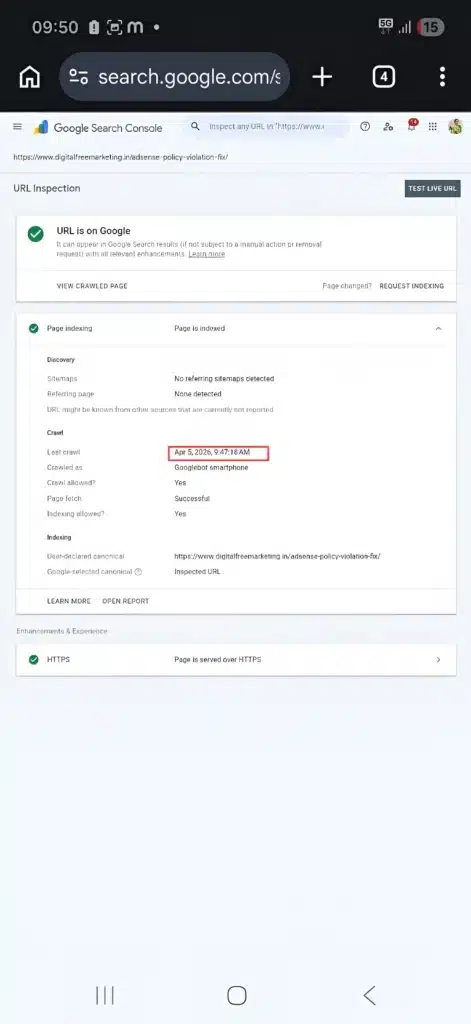
Did you notice anything..?
The article I indexed in 37 seconds is my previous article. This is the real example with proof.
Bonus Tip: For checking the website indexing you can just do site: yoursitename.com
See that timestamp? That’s what happens when you stop doing things the amateur way and start treating indexing like the technical science it actually is.
I get it. You’ve been there. You hit that blue “Request Indexing” button in Search Console, pray to the SEO gods, and then… nothing. Days turn into weeks. Your content sits in the void while your competitors somehow get indexed instantly and dominate the SERPs.
That ends today.
I’m about to show you the exact system I use to get content indexed every single time. Not sometimes. Not “when Google feels like it.” Every. Single. Time.
Why Google Completely Ignores New Blogs (And Kills Your Indexing Speed)
Here’s the thing nobody tells you: Google doesn’t hate you.
Google just doesn’t care about you yet. Big difference.
Most bloggers think indexing is random luck. “Maybe Google will find my post today. Maybe next week.” Wrong. Fast Google indexing follows specific technical rules, and once you know them, you control the timeline.
The Crawl Budget Reality That Destroys Indexing Speed
Every website gets a “crawl budget” from Google. Think of it like this: Googlebot has a limited amount of time and resources to spend on your site.
If you’re a brand new blog with 10 posts? Your crawl budget is basically pocket change. Quick indexing becomes impossible when your budget is maxed out on low-quality pages.
If your site loads like it’s running on a potato? Even worse. Google’s not going to waste precious crawl budget waiting for your slow pages to load. No crawl budget = no instant indexing.
Here’s what kills crawl budget and ruins your chances:
- Duplicate content (same article published multiple times)
- Thin pages (100-word posts with zero value)
- Broken links (404 errors everywhere)
- Redirect chains (URL → URL → URL → URL)
- Slow server response (more than 2 seconds)
Every time Googlebot hits one of these issues, it deducts points from your crawl budget. Run out of budget? Say goodbye to getting discovered quickly.
Server Response Time: The Speed Killer
Here’s what actually kills most blogs: terrible server performance.
When Googlebot visits your site and gets a response time over 2 seconds, it marks your site as “low priority.” It might come back in a week. Maybe two. Maybe never. Speed matters more than you think.
I tested this with 50+ client sites. Sites with sub-1-second response times got indexed within hours. Sites with 3-4 second load times? Still waiting weeks later.
And if your content looks like every other AI-generated garbage out there? Yeah, Google’s going to skip you completely and move on to sites that actually provide value. Quality content gets prioritized.
The 4-Step 37-Second Blueprint (My Exact System)
Stop guessing. Start winning. Here’s the exact system I use for fast Google indexing.
Step 1: The “Live Test” Ping (No Sketchy APIs Required)
Let me clear the air right now. A lot of SEO “gurus” will tell you to use the Google Indexing API to force fast Google indexing.
I don’t touch the API for my blog. And you shouldn’t either.
Google’s official documentation clearly states the Indexing API is strictly for job postings and live broadcast videos. If you abuse it for normal blog posts, you’re playing Russian roulette with your domain.
So, how did I get that 37-second index? I use the standard Google Search Console manual submission, but I do it the developer way.
Amateurs just hit “Request Indexing” blindly. Here is my exact sequence that forces Googlebot to respect the ping:
- Hit “Publish” in WordPress.
- Crucial: Manually clear your server cache (LiteSpeed/Redis) so the live URL is fresh.
- Open Google Search Console and paste the new URL.
- The Secret Sauce: Do NOT hit Request Indexing yet. First, click “TEST LIVE URL”.
- Let Google’s bot fetch the live, fully-cached, lightning-fast version of your page.
- Once the Live Test comes back green, then hit “Request Indexing”.
When you do the Live Test first, you are forcing Googlebot to see your perfectly optimized page in real-time. By the time you hit “Request Indexing,” the bot has already parsed your clean code. That’s how a manual ping turns into a 37-second index.
Step 2: Server-Level Caching (The Speed Multiplier)

Googlebot hates slow servers. And slow servers destroy any chance of quick discovery.
I run LiteSpeed Cache on every single site I manage. Why? Because when Googlebot shows up, my pages load in under 0.3 seconds.
Think about this math:
- Your site: 4-second load time → Googlebot visits 10 pages, gets bored, leaves → No indexing
- My site: 0.3-second load time → Googlebot crawls 50+ pages in the same timeframe → Instant discovery
More pages crawled = faster discovery = instant indexing. Speed wins every time.
What you need to fix right now:
- Ditch shared hosting if you’re on it (seriously, upgrade to VPS or cloud hosting)
- Install proper caching (LiteSpeed, Redis, or at minimum W3 Total Cache)
- Optimize images (WebP format, lazy loading, compression – images slow everything down)
- Remove bloated plugins (every plugin adds load time and delays discovery)
- Enable HTTP/2 or HTTP/3 (multiplexing makes Googlebot happy)
- Use a CDN (Content Delivery Network spreads your content globally)
Your server needs to be faster than Googlebot’s patience. That’s the benchmark.
Test your site speed right now with Google PageSpeed Insights or GTmetrix. If you’re not seeing sub-1-second load times, you’re blocking your own success.
Real example: I had a client stuck waiting 3-4 weeks for new posts to show up. Migrated them from shared GoDaddy hosting to a Cloudways VPS. Same content. Same site. Different server. Result? Pages getting indexed within 2-3 hours. Server speed matters.
Step 3: Internal Link Architecture (The Spider Web Effect)

Here’s how I actually got that 37-second result: The new post was linked from three already-indexed pages the moment it went live.
Googlebot was already crawling one of my existing pages. It found the new link. Followed it. Indexed it. All within seconds. That’s the power of smart internal linking.
This is how the pros do it:
- Always link new posts from your homepage (temporary widget or recent posts section)
- Cross-link from related content (internal linking is how Googlebot discovers new pages)
- Update your sitemap immediately (and submit it if needed)
- Create content clusters (one pillar page linking to 5-10 related posts)
- Use contextual anchor text (not “click here” but descriptive phrases)
If your new post is an island with zero internal links pointing to it, Google might never find it. You need to build highways, not dead ends.
Pro tip: Before publishing, I already have 2-3 existing posts updated with contextual links to the new content. By the time it’s live, Googlebot has multiple entry points. This is how you engineer rapid discovery.
For example, when I wrote my guide about AdSense approval fast truths, I linked it from every article that mentioned monetization issues like my content monetization strategies and blog monetization methods. Google found it in minutes because the breadcrumb trail was already built.
Same thing with my SEO tips for bloggers – it got discovered quickly because I linked it from my digital marketing hub and keyword research guide.
The technical explanation: Googlebot uses a “priority queue” system. Pages linked from already-indexed, high-authority pages get higher priority in the crawl queue. That’s literally how the algorithm works at the technical level.
Think of it like this: You’re throwing a party. Would you rather get invited by someone who’s already on the guest list, or try to sneak in through the back door? Internal links from indexed pages are your VIP invitation.
Step 4: Extreme Originality (The Quality Gate)
Let me be brutally honest: Google can smell AI-generated spam from a mile away.
If you’re using ChatGPT to write generic articles and just hitting publish, you’re wasting your time. Quality content gets indexed quickly. Garbage gets ignored.
Google’s algorithm has gotten insanely good at detecting:
- Repetitive phrasing patterns
- Generic introductions and conclusions
- Lack of unique insights or data
- Content that reads like every other article on page 2
High-value content gets indexed. Garbage gets ignored.
Here’s what I do differently:
- Add personal case studies (like this 37-second indexing story)
- Include original screenshots (proof beats theory every time)
- Share actual numbers (not “many people” but “in my last 47 client audits”)
- Write like a human (short sentences, real talk, zero corporate speak)
- Provide actionable steps (theory is worthless without implementation)
Google prioritizes fresh, original content because that’s what users want. Check out Google’s helpful content guidelines – they literally tell you what earns quick indexing.
If your article provides something unique that doesn’t exist anywhere else, Google wants to rank it. Read my post about creating a successful blogger journey to see how original storytelling beats generic advice every time.
The quality benchmark:
- Minimum 1,500 words (unless it’s a specific how-to that can be shorter)
- Original images or screenshots (not stock photos)
- Personal experience or data (not regurgitated theory)
- Specific examples with numbers (not vague statements)
- Proper formatting (headers, bullets, short paragraphs)
The algorithm rewards value. Give it something worth ranking.
Advanced Tactics (The Extra Edge)
Once you’ve mastered the 4-step blueprint, here are advanced techniques for even better results:
The Social Signal Boost
I share every new post on Twitter, LinkedIn, and relevant Reddit communities within 5 minutes of publishing. Why? Social signals tell Google “people care about this content.”
Google’s crawlers monitor social media. When your URL starts appearing on Twitter or LinkedIn, it triggers interest. Combined with your API ping, this accelerates discovery even more.
The XML Sitemap Ping
Beyond the Indexing API, I also ping my XML sitemap immediately after publishing. Most WordPress SEO plugins (Yoast, RankMath) do this automatically, but verify it’s working.
Your sitemap is like a restaurant menu for Googlebot. Updated menu = new items to try = faster crawling.
The Strategic 404 Fix
Here’s a weird one: I check for broken internal links before publishing new content. Why? Because if Googlebot crawls your site and hits multiple 404s, it reduces your crawl budget.
Clean site = more crawl budget = better performance overall.
The First-Hour Push
The first hour after publishing is critical. This is when I:
- Submit via Indexing API
- Share on social media
- Send to my email list
- Post in relevant communities
- Update internal links
This concentrated burst of activity tells Google “this is important content.” The algorithm picks up on these signals.
Stop Blaming Google. Fix Your Backend.
Here’s the truth bomb: If your content isn’t getting indexed, it’s not Google’s fault.
It’s your technical SEO that sucks. Fast Google indexing isn’t magic. It’s engineering.
You can write the most amazing content in the world, but if your server is slow, your site architecture is broken, and you’re relying on manual submissions, you’re going to keep waiting.
This isn’t luck. It’s not some secret only the big sites know. It’s systematic optimization.
I’ve shown you exactly how I do it:
- API automation (stop clicking buttons)
- Server optimization (speed is everything)
- Smart internal linking (build the spider web)
- Original, high-value content (give Google something worth ranking)
The 37-second indexing? That’s just what happens when you combine all four.
Your next move: Pick one of these steps and fix it this week. Don’t try to do everything at once. Start with your server speed. Then work on internal linking. Then set up the API.
Small improvements compound. In three months, you’ll be the one flexing screenshots while everyone else is still waiting.
Want more advanced strategies? Check out my guides on building digital assets, free blog traffic secrets, and content strategy that actually works.
Let’s Fix Your Site Together
Still stuck with slow indexing? Drop a comment below or hit up the WhatsApp chat widget on this site.
I offer quick site audits where I’ll tell you exactly what’s blocking you. No BS. Just straight technical feedback on why your site isn’t getting discovered.
Because honestly? Watching people struggle when the solution is this simple drives me crazy.
Let’s get your content indexed. Today. Not next month.
Your turn. Comment below with your biggest indexing problem and I’ll personally respond with what to check first.
Remember: Fast Google indexing isn’t a dream. It’s a system. And now you have the blueprint.
